● Android・Windows・Apple Silicon Mac対応
Windowsのマウス1つで
スマホ・タブレット・Macを操作。
Windowsのマウス・キーボードを複数のデバイスで共有。ケーブルや専用KVM機器は不要です。
接続元Windows 10/11
→
Android 対応
別のWindows PC 対応
macOS 13+ 対応
1マウスを動かしてカーソルを渡してみましょう
2デバイスの名札をドラッグして位置を変えてみましょう
3ファイルをドラッグして別のデバイスへ送りましょう
デバイス配置とカーソル移動を体験できるブラウザー上のデモです。
こんなときに便利
Windowsでしていた作業を、スマホ・別のPC・Macまで。
スマホを隣の画面のように操作
PCモニターの端へマウスを押し込むとAndroidへ移り、クリック・スクロール・ドラッグまでそのまま続きます。
長い文章もPCキーボードで
検索ワード、メッセンジャーの返信、アプリの入力欄まで、スマホで打ちたい瞬間にPCのキーボードをそのまま使えます。
ファイル・クリップボードをすぐ転送
デバイス間でファイルを転送し、クリップボードのテキストを共有できます。ファイル転送ガイド
別のWindows PCも一緒に
サブPCを配置しておけば、マウスを渡して別のPCを操作し、ファイルもやり取りできます。
Apple Silicon Macにも接続
カーソル移動、キーボード入力、ファイル、クリップボードをWindowsからMacへ引き継げます。
Bluetoothでもつながります
Androidと別のWindows PCはBluetoothでも接続できます。Macは同じネットワークで接続します。
スマホの通知と認証コードをPCで
スマホの通知をPCで確認し、対応する認証コードをコピーできます。通知の設定
接続方法
Androidとの接続は4ステップ。
MacはMac接続ガイドをご覧ください。
01
Windowsアプリを起動
メインPCでOneMouseを起動します。
02
Androidの権限を許可
スマホアプリを開き、アクセシビリティを許可します。
03
QR・6桁コードで接続
同じネットワークのPCを探し、QRをスキャンするかコードを入力します。
04
配置して渡します
スマホを配置し、その方向へマウスを移動します。
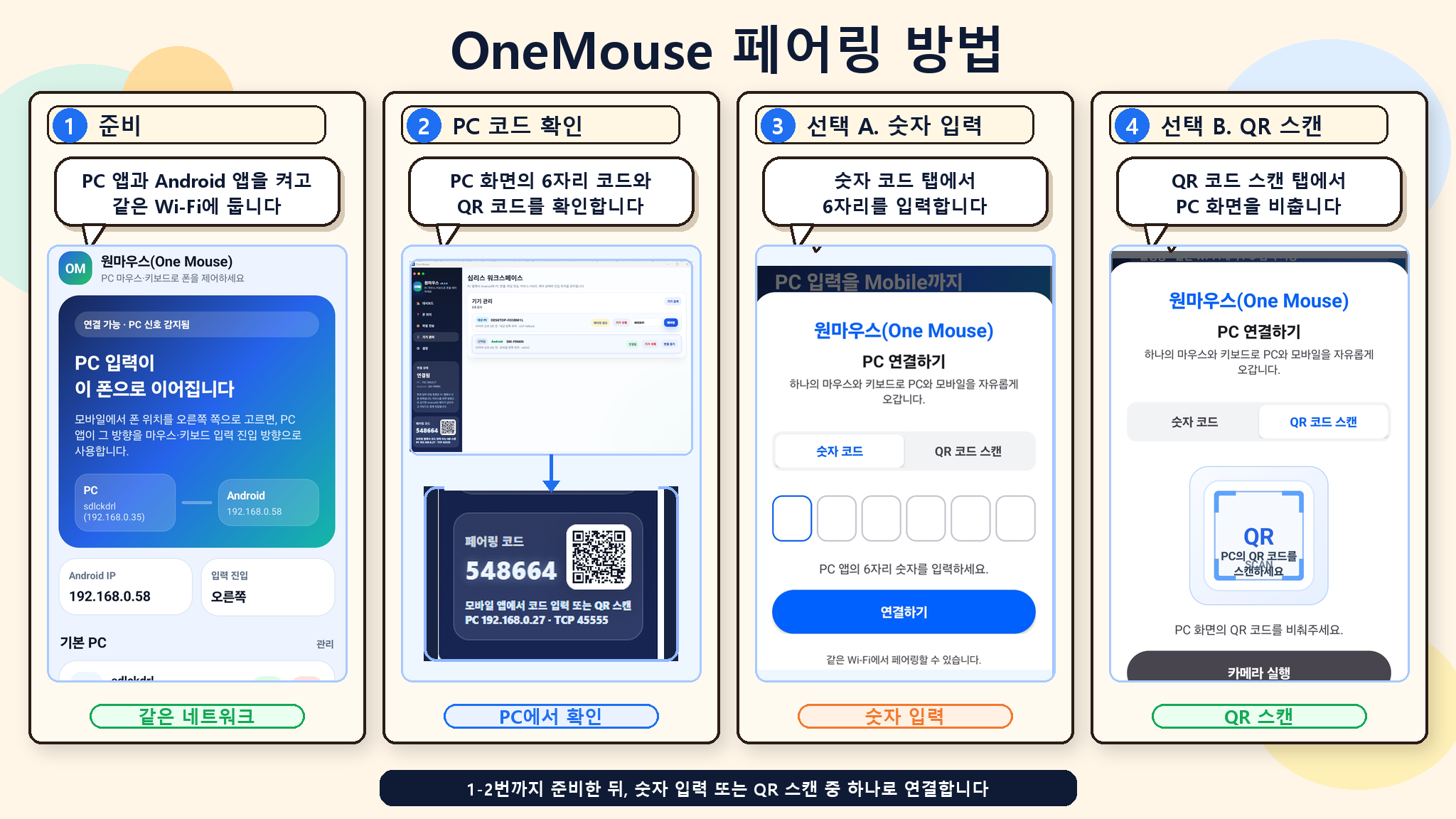
実際のペアリング画面を見る準備 → PCコード確認 → 数字入力 → QRスキャン
安心してお使いください
自分のデバイス同士で、自分のネットワークの中で。
デバイス間で直接転送入力・ファイル・クリップボードのテキストはペアリングしたデバイス間で直接やり取りします。
必要な権限のみAndroidやMacのアクセシビリティなど、機能に必要な権限を使用します。
アクセシビリティデータの用途アクセシビリティデータを広告や画面の収集に使用しません。
ダウンロード
Windowsと接続するデバイスにインストール。
Macとの接続はどこから始めますか?
接続はWindows 10/11から開始・管理します。Windowsのデバイス管理でMacを選び、Macに表示された6桁コードを入力します。
ルート化や開発者設定は必要ですか?
いいえ。Androidでアクセシビリティサービスを一度オンにするだけです。USB接続やADBも必要ありません。
同じWi-Fiがなくても使えますか?
Androidと別のWindows PCはBluetoothで直接接続できます。Macは同じネットワークで接続します。
接続がよく切れます。
多くはバッテリー最適化やファイアウォール・ゲストWi-Fiのクライアント分離が原因です。ヘルプのトラブル解決手順に沿って、段階的に絞り込んでみてください。
スマホのSMS認証コードをPCでそのまま使えますか?
対応する認証コードはコピーできます。設定とAndroid 15以降の保護については
通知のヘルプをご覧ください。
ソフトウェアKVMとは?OneMouseもそうですか?
専用機器なしで、複数のデバイスでマウス・キーボードを共有するソフトです。各デバイスの画面はそのまま使用します。