● Android、Windows 与 Apple 芯片 Mac
一只 Windows 鼠标,
轻松操控手机、平板与 Mac。
在多台设备间共享 Windows 鼠标和键盘,无需线缆或专用 KVM 设备。
连接发起端Windows 10/11
→
Android 已支持
另一台 Windows PC 已支持
macOS 13+ 已支持
1移动鼠标,把光标滑过去看看
2拖动设备名牌,换个位置试试
3拖动文件发送到其他设备
在这个浏览器演示中体验设备布局和光标移动。
这些场景很好用
在 Windows 前做的事,延伸到手机、另一台电脑和 Mac。
把手机当作旁边的屏幕来控制
把鼠标推到电脑显示器边缘,就会跨到 Android,点击、滚动、拖拽一气呵成。
长句子也用电脑键盘打
搜索词、聊天回复、应用输入框,凡是要在手机上打字的时候,都能直接用电脑键盘。
文件·剪贴板即传即到
在设备间传输文件并共享剪贴板文字。文件传输指南
另一台 Windows 电脑也能一起用
摆好另一台电脑,就能把鼠标滑过去控制它,还能互传文件。
连接 Apple 芯片 Mac
从 Windows 将光标移到 Mac,并继续使用键盘输入、文件和剪贴板传输。
用 Bluetooth 也能连
Android 和其他 Windows 电脑也可通过 Bluetooth 连接。Mac 使用同一网络连接。
手机通知和验证码,直接在电脑上
在电脑上查看手机通知,并复制支持的验证码。通知设置
01
打开 Windows 应用
在主电脑上启动 OneMouse。
02
允许 Android 权限
打开手机应用并允许无障碍权限。
03
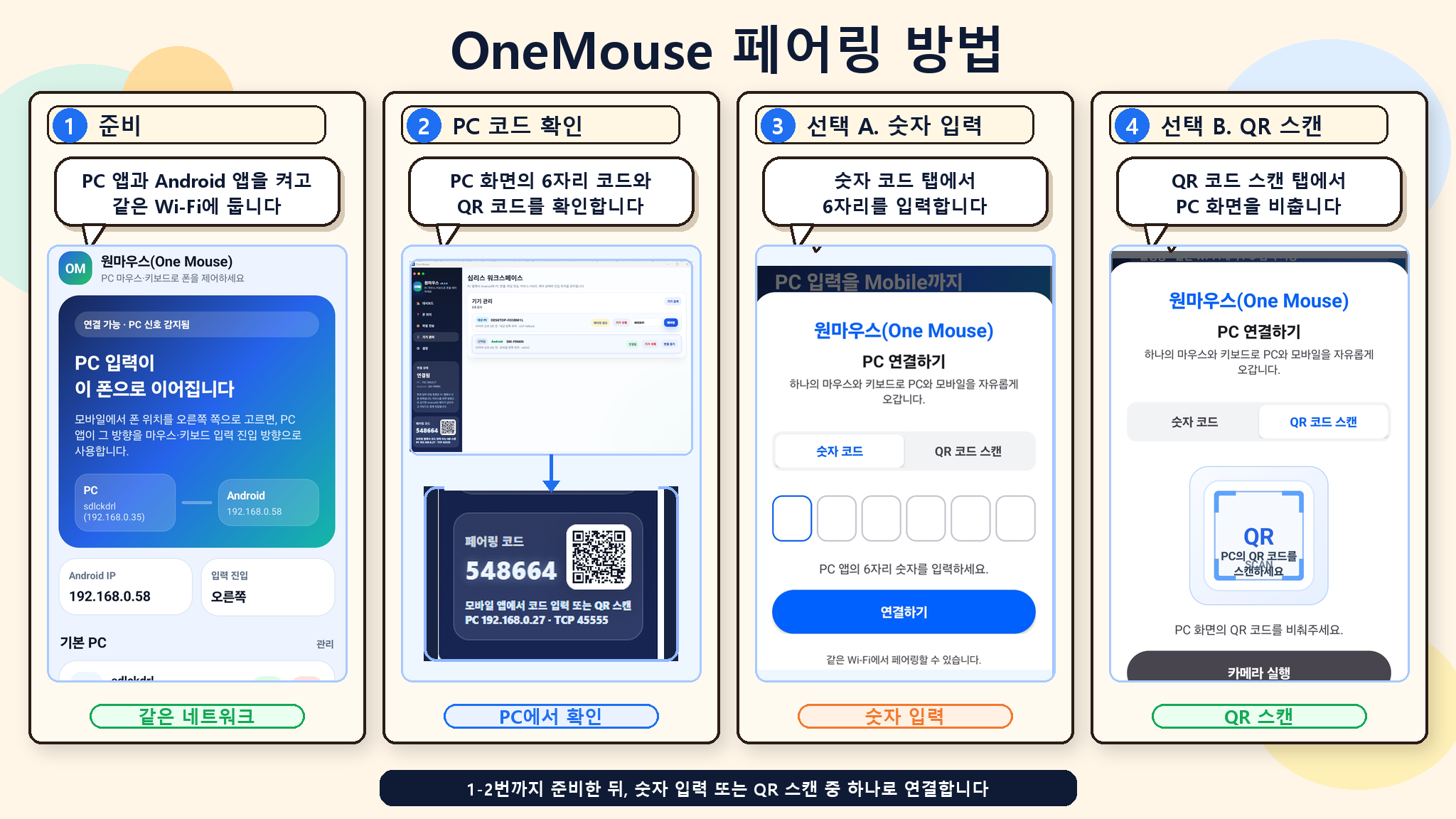
用二维码或 6 位代码配对
找到同一网络中的电脑,扫描其二维码或输入代码。
04
摆好位置再滑过去
在布局中摆好手机,将鼠标移向对应方向。
看看真实的配对画面准备 → 确认电脑数字码 → 输入数字 → 扫二维码
设备间直接传输输入、文件和剪贴板文字在已配对的设备间直接传输。
仅使用所需权限使用 Android 无障碍、Mac 辅助功能等各项功能所需的权限。
需要 root 或开发者设置吗?
不需要。在 Android 上只要打开一次无障碍服务就行。也不需要 USB 连接或 ADB。
没有同一个 Wi-Fi 也可以吗?
Android 和其他 Windows 电脑可通过 Bluetooth 直接连接。Mac 使用同一网络连接。
Mac 连接由哪一端发起?
连接由 Windows 10/11 端发起并管理。在 Windows 的设备管理中选择 Mac,然后输入
Mac 上显示的 6 位代码。
连接总是断开。
多半是电池优化或防火墙、访客 Wi-Fi 的客户端隔离导致的。请按帮助里的排障步骤逐步缩小范围。
能在电脑上直接用手机短信里的验证码吗?
支持的验证码可通过复制按钮使用。设置和 Android 15 及更高版本的保护说明,请参阅
通知帮助。
什么是软件 KVM?OneMouse 算吗?
无需专用硬件,即可在多台设备间共享鼠标和键盘。每台设备仍使用自己的屏幕。